


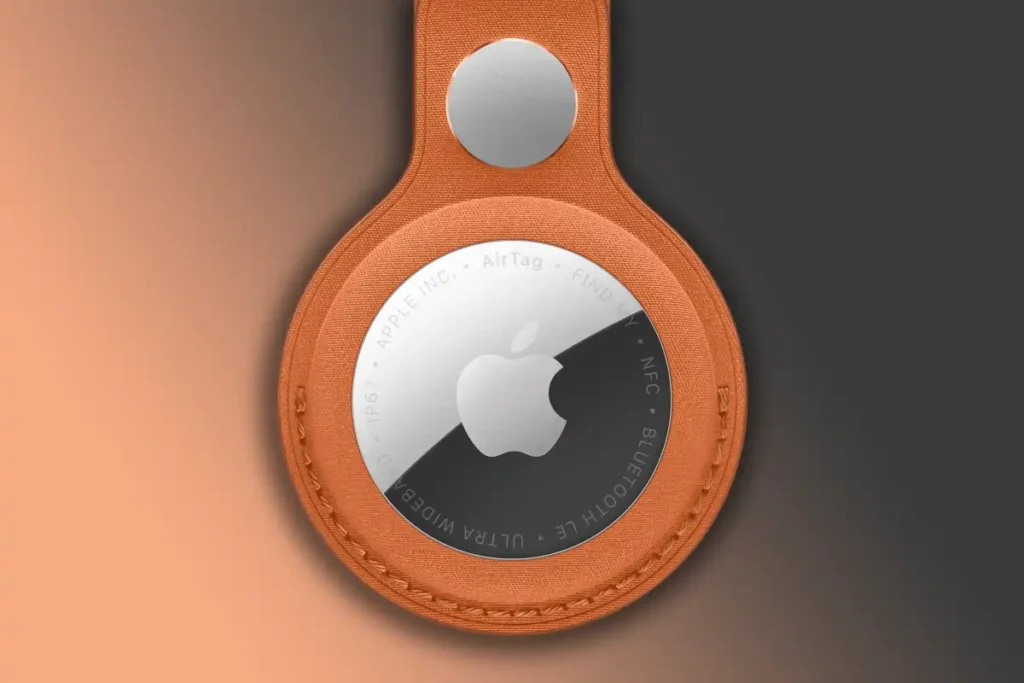
Apple AirTags Explained: How They Work, What’s New, and Why You Need One
Apple AirTags have quickly become one of the most useful gadgets for anyone who hates losing things. Whether it’s your luggage, keys, wallet, or even your pet’s collar, these small Bluetooth-powered trackers make finding misplaced items surprisingly simple. With the launch of the second-generation AirTag, Apple has introduced upgrades that make the experience even better, including longer range, improved battery life, and a louder speaker.
If you’ve ever stood at an airport baggage claim wondering whether your suitcase made it onto your flight, you already know why these little devices have become such a big deal.
What Exactly Is an Apple AirTag?
An Apple AirTag is a small Bluetooth tracking device shaped like a glossy white puck. It’s roughly the size of a US quarter and only as thick as three coins stacked together. Inside is a CR2032 coin cell battery that powers the AirTag for about a year before it needs replacing.
Once paired with an iPhone or iPad, the AirTag does its job in the background. You can attach it to your keychain, slip it into a backpack, or hide it inside luggage. From that point on, you can use Apple’s Find My app to locate it whenever needed.
What’s New in the Second-Generation AirTag
Apple kept the same look for the second-generation AirTag, but the upgrades on the inside make it noticeably more capable. The new model brings five major improvements:
- Precision Finding range is now 1.5 times greater, thanks to a second-generation ultra-wideband chip.
- Apple Watch users with Series 9, Ultra 2, or later models can now use Precision Finding directly from their wrist, after updating to WatchOS 26.2.1.
- A new Bluetooth chip extends the range at which AirTags communicate with nearby devices.
- The built-in speaker is 50 percent louder, making it easier to hear when you’re searching around the house.
- The chime sound has been redesigned to stand out better in noisy environments.
These upgrades may seem small individually, but together they make the AirTag noticeably more reliable.
How to Tell the Two Generations Apart
If you placed a first-gen and second-gen AirTag side by side, you wouldn’t immediately notice a difference. The second-gen version is only 0.8 grams heavier. However, a quick look at the metal back reveals subtle clues.
The new AirTag features text in all caps and includes labels like “Find My,” “NFC,” and “IP67,” signaling its connectivity options and water and dust resistance. The original version, on the other hand, displays the familiar “Designed by Apple in California” and “Assembled in China” markings.
How Much Do Apple AirTags Cost?
A single Apple AirTag retails for $29 directly from Apple, though many electronics stores sell it for around $24. The better deal, however, is the four-pack, which costs $99 from Apple and as low as $75 at retailers like Amazon, Best Buy, or Walmart. That brings the per-unit price below $20.
A few extra notes on pricing:
- The newer second-gen models will likely stay at full retail for a while.
- The first-gen AirTags are still excellent value, especially during sales or clearance events.
- Buying directly from Apple lets you add free engraving such as initials, numbers, or emojis.
Setting Up an Apple AirTag
Setting up an AirTag is incredibly easy. Each new tag comes with a small plastic tab that keeps it inactive. Once you remove the tab, the AirTag wakes up and starts broadcasting.
To pair it:
- Bring it close to your iPhone or iPad.
- A pop-up will appear asking if you want to connect it.
- Choose a category like “Keys,” “Backpack,” or create a custom name.
- Pick an emoji for easy identification in the Find My app.
- Tap Continue, and your AirTag is now linked to your Apple ID.
How to Find an AirTag
To track an AirTag, open the Find My app and tap the Items tab. From there:
- Select the AirTag you’re looking for.
- Tap Play Sound if you think it’s nearby. The AirTag will emit a chirp to help you locate it.
- If you have an iPhone 11 or newer, tap Find for Precision Finding, which uses ultra-wideband technology to guide you with directional arrows and exact distance measurements.
- If the AirTag is far away, the app will show its last known location and offer turn-by-turn directions in Maps.
Apple Watch Series 9 and Ultra 2 owners can also enjoy Precision Finding directly on their wrist.
Notifications That Help You Avoid Losing Items
One of the most underrated features is “Notify When Left Behind.” When enabled, your iPhone alerts you if you walk away from your AirTag, helping you avoid leaving items at restaurants, hotels, or airports. It can also serve as a quick warning if someone tries to take an item without your knowledge.
How AirTags Actually Work
The magic behind AirTags lies in Apple’s massive Find My network. While the tag itself only emits a low-power Bluetooth signal, that signal is picked up by any nearby iPhone, iPad, or Mac. Those devices then anonymously relay the AirTag’s location to Apple’s servers.
This means that even if your bag ends up in another country, any nearby Apple device can help update its location. Importantly, this entire process is encrypted, anonymous, and uses minimal battery power on the relaying device.
What About Privacy and Tracking Concerns?
Apple has built several safeguards to prevent AirTags from being misused. If an unknown AirTag stays close to you for too long, your iPhone or iPad will display a warning that says “AirTag Found Moving With You.”
If you receive that alert:
- Open Find My, tap Items, then Identify Found Item.
- Hold the AirTag near the top of your iPhone for an NFC scan.
- A web page will display its serial number and contact options.
- You can also follow steps to disable it.
This system protects users from being tracked without consent.
What If Your AirTag Is Lost or Stolen?
If your AirTag is missing, the Find My app offers helpful options. You can enable Lost Mode and add contact details so anyone who finds it can reach you. You can also share the AirTag’s location with someone you trust, such as a family member or law enforcement, using a temporary one-week link.
For safety reasons, never try to confront someone who may have stolen your belongings.
Sharing AirTags With Family
Apple now allows up to five people to share an AirTag’s location, which is great for couples and families. Just tap the tag in Find My, choose Add Person, and select a contact. Once they accept the invite, the warning notifications about unknown trackers will no longer appear for them.
Battery Life and Replacement
Each AirTag’s CR2032 battery lasts about a year. When the battery gets low, you’ll receive a notification, and a red icon will appear in Find My. Replacing the battery is straightforward:
- Turn the silver back counter-clockwise to unlock it.
- Swap in a new CR2032 battery.
- Twist the back clockwise until you hear a chirp confirming the connection.
Can Android Users Use AirTags?
Unfortunately, Apple AirTags do not work fully with Android. There is no Find My app for Android. However, Android phones with NFC can scan a found AirTag to view its information. For Android users wanting similar functionality, the Chipolo One Point works with Google’s Find My Device network.
Final Thoughts
Apple AirTags are one of those rare gadgets that quietly make life easier. From luggage tracking to keeping tabs on everyday essentials, they’ve become an indispensable tool for many users. With the second-generation upgrades, they’re now faster, louder, and more accurate than ever, making them an even smarter investment for anyone tired of losing things.
Whether you’re a frequent traveler, a forgetful keys-loser, or just someone who likes peace of mind, Apple AirTags continue to prove that small devices can deliver big convenience.