


Windows 11 Restart Button Update: Microsoft Finally Listens to Frustrated Users
The Windows 11 restart button update is finally bringing some long-overdue sanity to one of the most frustrating quirks in the operating system’s history. For years, Windows users have shared a common gripe — clicking “Restart” or “Shut Down” rarely meant what it said. Instead of doing what you actually wanted, Windows would often hijack the moment and force you to sit through a lengthy update process before you could get on with your day.
That irritation is finally being addressed. Microsoft has announced a major change that will let users restart or shut down their PCs immediately, without being forced to install pending updates first. It’s a small change on paper, but for anyone who has ever stared helplessly at their screen while Windows installed updates at the worst possible moment, it feels like a huge win.
The Pain Point Microsoft Is Finally Fixing
If you’ve used Windows for any meaningful amount of time, you’ve almost certainly experienced this scenario. You’re rushing out the door, you click “Shut Down,” and instead of powering off, your laptop announces that it’s installing updates. You’re stuck waiting — sometimes for several minutes, sometimes much longer — while Windows does its thing.
Or maybe you needed a quick restart to fix a minor issue. Click “Restart,” and suddenly you’re trapped in update purgatory, unable to get back to work until the system finishes downloading and applying patches you never asked it to handle right that second.
It’s been a source of universal frustration among Windows users for years, and Microsoft has finally decided to do something about it.
What’s Actually Changing With the Power Menu
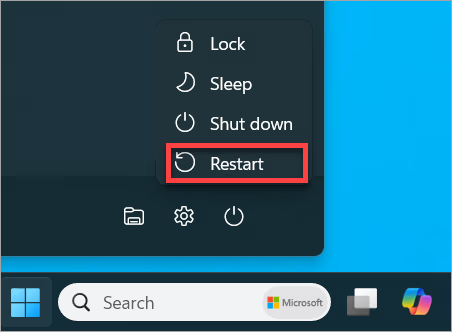
According to Microsoft’s announcement on the Windows Blogs, the update introduces a fundamental shift in how the Power menu behaves. From now on, when you hit “Restart” or “Shut Down,” Windows will do exactly that — no surprise updates, no forced waiting, no detours.
If you do want to install pending updates as part of your restart or shutdown, that option is still available. The key difference is that it’s now your choice, not Windows’ decision. The Power menu is becoming predictable, which is honestly how it should have been all along.
This change is currently rolling out to Windows Insiders, meaning it’s still in testing before reaching the general public. However, since the modification is fairly straightforward, it shouldn’t take too long before everyone gets access to it.
Faster App Restoration After Restart
Beyond just fixing the Power menu’s behavior, Microsoft is also tweaking what happens after you restart your PC. The update introduces faster restoration of previously opened applications, meaning you can get back to work or play more quickly after a restart.
This is a thoughtful addition. Restarting your computer often means losing your workflow momentum — you have to reopen your browser tabs, relaunch your apps, and rebuild your digital workspace from scratch. By speeding up app restoration, Microsoft is helping users transition more smoothly from a restart back into productive use.
It’s the kind of small quality-of-life improvement that adds up over time. When combined with the new Power menu behavior, the overall restart experience becomes significantly less disruptive.
More Control Over Windows Updates
The good news doesn’t stop with the Power menu. Microsoft is also rolling out several enhancements to give users more control over when and how Windows updates get installed. These changes include the following improvements:
Users can now indefinitely delay updates in 35-day bursts. If you’re not ready to install an update, you can push it back for over a month at a time, and you can keep doing this as needed. This is a major win for anyone who has been burned by buggy updates in the past or simply wants to wait until others have tested a new patch.
You can also pick a specific day for updates to install. Rather than having Windows decide when to apply patches, you get to choose a day that works for your schedule. No more updates kicking in during important meetings or while you’re in the middle of a critical task.
Additionally, Windows Update will no longer force new update downloads during the Out-of-Box Experience (OOBE). This means when you’re setting up a new PC, you can land on the desktop faster instead of waiting through update installations during the initial setup process.
Why These Changes Matter
Taken together, these updates represent a meaningful shift in how Microsoft approaches the user experience. For a long time, the company seemed to prioritize getting updates installed over user convenience. The result was a system that felt like it was working against you rather than for you.
These new changes signal a different philosophy. Microsoft appears to be acknowledging that users should have more agency over their own machines. It’s a refreshing approach, and one that addresses some of the most consistent complaints about Windows over the years.
The benefits are real and tangible:
- Less wasted time waiting for unwanted updates
- More predictability when you need to quickly restart or shut down
- Greater control over your update schedule
- Faster setup process for new PCs
- Smoother return to work after a restart
A Pattern of User-Focused Changes
This restart button update is part of a broader trend of Microsoft addressing long-standing pain points in Windows 11. The company has been steadily rolling out improvements aimed at making the operating system more user-friendly and responsive to feedback.
Whether it’s redesigned interface elements, improved performance, or better customization options, Microsoft seems to be in a phase of actively listening to its user base. The Power menu change is a perfect example of this — it’s a fix that doesn’t add flashy new features but addresses a genuine frustration that real users have been complaining about for years.
When Will Everyone Get These Features?
For now, the updates are available through the Windows Insider program, which is Microsoft’s testing channel for upcoming features. If you’re enrolled in the Insider program, you can try out the new Power menu behavior and update controls right away.
For everyone else, the wait shouldn’t be too long. Since these changes are relatively minor in terms of underlying system architecture, they’re likely to roll out to general users in the coming months. Microsoft typically tests features in the Insider channel for a few weeks or months before pushing them to the broader Windows 11 user base.
What to Expect From Future Windows Updates
If this trend continues, Windows 11 users have a lot to look forward to. Microsoft seems committed to refining the operating system based on real user feedback, which means more pain points are likely to get addressed over time.
Some areas that could benefit from similar attention include:
- The right-click context menu, which still requires extra steps for common tasks
- File Explorer performance, which can feel sluggish at times
- Notification management, which many users find overwhelming
- Default app handling, which has been a source of ongoing frustration
If Microsoft applies the same user-centric approach to these areas, Windows 11 could become a noticeably more pleasant operating system to use.
A Small Change With Big Impact
It might seem strange to get this excited about a button finally doing what it’s supposed to do. But for anyone who has felt the frustration of being held hostage by Windows updates at inconvenient moments, this change represents real relief.
The Windows 11 restart button update is more than just a minor tweak — it’s a sign that Microsoft is genuinely listening to its users and taking action on their feedback. When you combine the new Power menu behavior with faster app restoration and improved update controls, you get an operating system that respects your time and gives you more agency.
Final Thoughts
For decades, Windows users have lived with the quirks and inconveniences of an operating system that sometimes seemed to have a mind of its own. The new restart button update, along with the accompanying Windows Update improvements, represents a meaningful step toward giving users back control over their PCs.
Whether you’re someone who has ranted about forced updates for years or simply someone who appreciates a more predictable computing experience, there’s a lot to like in this announcement. Microsoft has finally decided that when you click “Restart,” you should get a restart — not a surprise update session.
Once these features roll out to everyone, Windows 11 will feel just a little more user-friendly, and that’s a victory worth celebrating. Sometimes the best updates aren’t the ones that add new features but the ones that fix the things we’ve been complaining about for years.